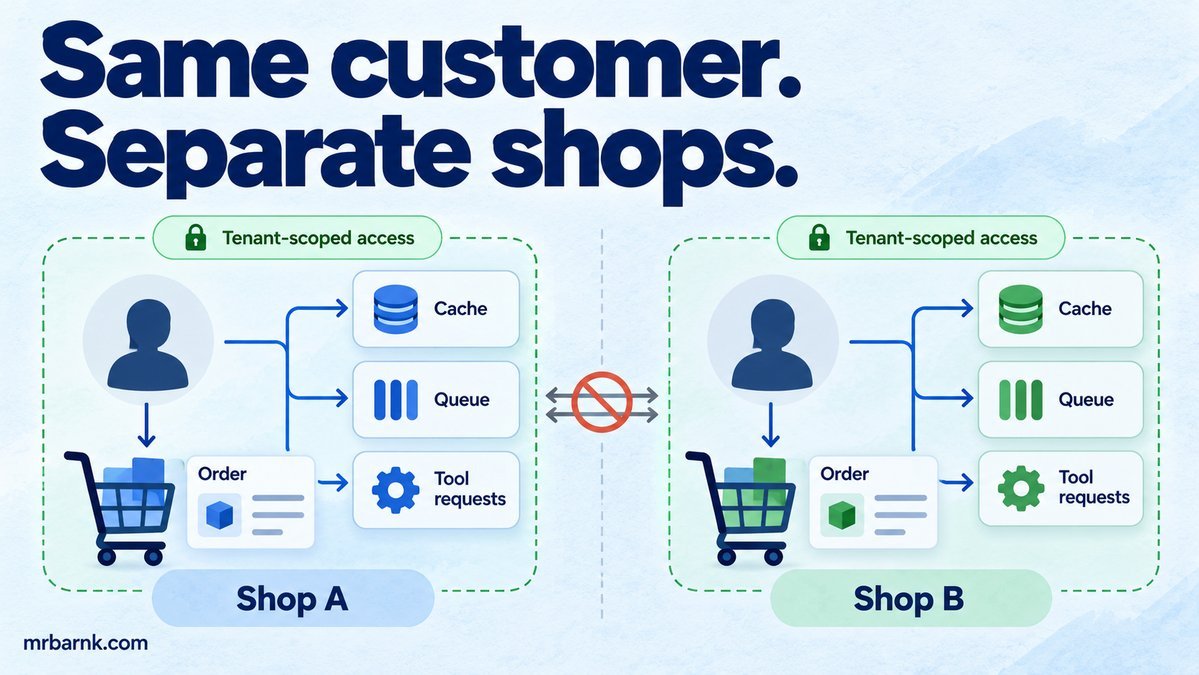
A multi-tenant WhatsApp agent can answer correctly for one shop and still be unsafe for the next. If the same customer number chats with two businesses, a cache keyed only by that number can load the wrong cart or order history.
The model doesn’t need to do anything unusual for this to happen. An ordinary missing business ID is enough. Let’s establish the business identity first, then carry it through every place where data is read or an action is taken.
Identify the business before interpreting the message
At the webhook boundary, verify the request and map the receiving business phone ID to an internal tenant. That mapping belongs to your application configuration. Don’t let the customer’s text choose it.
Create a trusted context containing the tenant ID, customer identity and allowed operation scope. Pass that context to your tools outside the model-generated arguments. If the model suggests a different tenant, ignore or reject that field rather than treating it as a routing instruction.
Also distinguish a phone number from proof of permission to access every order associated with it. Some operations need stronger identity checks, particularly when account details or payment actions are involved.
Make tenant scope part of the key
Use (tenant_id, customer_id) for conversation state and (tenant_id, order_id) for orders. A unique order identifier is useful, but it doesn’t remove the need to check ownership when returning it.
Cache keys need the same scope. Use a structured encoding of the tenant, subject and data version. Plain string concatenation can create collisions when values contain separators.
Queue payloads should carry a trusted tenant reference and the originating inbox ID. When a worker loads the job, verify that those records agree. A valid signed webhook doesn’t excuse a later programming error that attaches it to another business.
Build a tenant-bound tool
This example lets two shops use the same local order identifier. The tool accepts only the order ID as an argument; tenant and customer scope come from trusted context.
import assert from 'node:assert/strict';
const rows = [
  { tenant: 'shop-a', customer: 'c1', id: 'order-1', item: 'Trainers' },
  { tenant: 'shop-b', customer: 'c1', id: 'order-1', item: 'Headphones' },
];
function orderTool(context, args) {
  if (!context?.tenant || !context?.customer) throw new Error('Missing trusted scope');
  const row = rows.find(r => r.tenant === context.tenant && r.customer === context.customer && r.id === args.orderId);
  if (!row) throw new Error('Order unavailable');
  return structuredClone(row);
}
const key = (tenant, subject) => JSON.stringify([tenant, subject]);
assert.equal(orderTool({ tenant: 'shop-a', customer: 'c1' }, { orderId: 'order-1', tenant: 'shop-b' }).item, 'Trainers');
assert.throws(() => orderTool({ tenant: 'shop-a', customer: 'c2' }, { orderId: 'order-1' }));
assert.throws(() => orderTool({}, { orderId: 'order-1' }));
assert.notEqual(key('a:b','c'), key('a','b:c'));
console.log('PASS: tenant scope, customer ownership, missing context and cache keys');
The first customer gets only the order that belongs to their shop and identity. Changing a model-supplied tenant field has no effect. A forged customer context is outside this example’s boundary; the authentication layer must establish that context correctly.
Add a database boundary as well
Application filters are the first layer. You can also use database permissions and row-level policies to restrict which rows a service session can access. PostgreSQL documents row-level security, including roles that bypass it, so deployment configuration matters. PostgreSQL row security.
If you set a tenant context on pooled connections, scope it to the transaction and reset it correctly. A leaked session setting can carry one business into the next request. Test this using the same pool connection, not only fresh connections created for each test.
Policies should protect writes too. A filter on order lookup doesn’t stop an update statement from changing another tenant’s order. Make the tenant part of update conditions, foreign-key relationships and audit records.
Retrieval and memory need the same treatment
A shared vector collection can return the wrong shop’s product document if a tenant filter is omitted. Keep the filter in trusted retrieval code and check document ownership again when constructing a tool result.
Scope conversation summaries, embeddings, cached tool results and evaluation fixtures. A summariser that receives mixed-tenant history can leak information even when the final order tool is secure.
Avoid putting secrets into prompts or expecting the model to keep one tenant’s private data hidden from another. The stronger design is to never retrieve that other data for the request in the first place.
Check background paths and support access
Isolation bugs often appear in less-used paths: export jobs, delayed notifications, dead-letter replays and support dashboards. Carry the tenant in those paths and verify the operator’s access separately.
A support user who can view several shops should still act within one explicit scope at a time. Include the business name in the interface and record who performed each action. Don’t treat broad support visibility as blanket permission for every financial operation.
Test pairs that deliberately collide
Create the same customer ID, order ID and product SKU in two tenants. Run requests concurrently, alternate them on one database connection and warm caches in the opposite order. Check the returned data and every side effect.
Then test missing tenant context. The safest result is a clear failure. A default shop or an unfiltered query turns a configuration mistake into a data exposure.
Start with the cache and tool boundaries you already have. Add the business identity to the key and make tool implementations require trusted context. Once that is consistent, database policies and replay tests give you additional protection against the next missed filter.
Run the example and adapt it
Save the code as 31-tenant-safe-whatsapp-agents.mjs and run it with Node.js 24 or later:
node 31-tenant-safe-whatsapp-agents.mjs
The code above includes assertions you can run locally. It tests the local decision logic with controlled inputs; it doesn’t connect to a live provider or establish production performance. Keep that boundary when adapting it to your application.