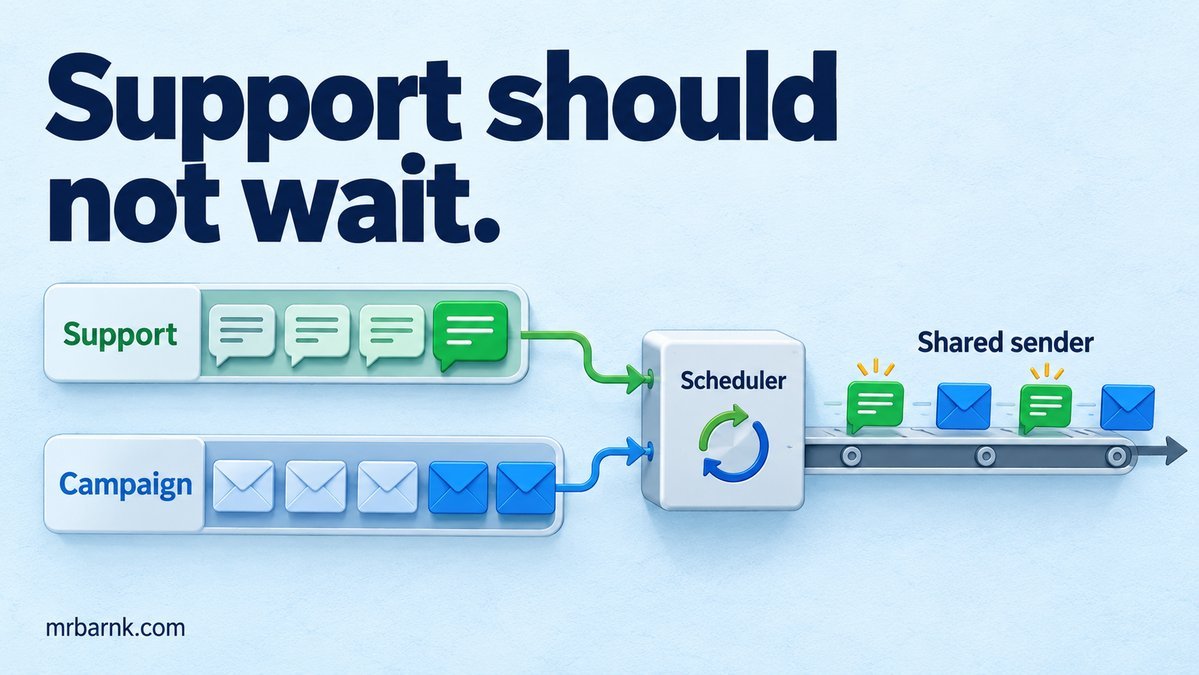
WhatsApp queue prioritisation helps when a campaign and a live support conversation share the same workers. Your campaign can be moving along nicely while a customer waits for a simple answer about an order.
Both messages may use the same outbound API. They don’t have the same urgency. Let’s give the conversation room to move without letting one business take every available slot.
We’ll start with the queue order. Then we’ll look at the provider capacity that the queues still have to share.
Separate the work before changing worker counts
Put live replies and bulk campaigns in distinct lanes. Add a creation time, deadline, tenant ID and estimated work class to each job. Use separate retry schedules so a campaign failure doesn’t immediately jump back in front of a support reply.
This doesn’t require separate physical brokers at first. The important part is that your scheduler can choose between the workloads. A single first-in-first-out list hides that choice.
Avoid assigning priority based only on a caller-supplied field. The service accepting the job should decide whether it is actually an interactive reply. Otherwise, every campaign can mark itself urgent.
Give interactive work preference with a limit
Always choosing support sounds attractive, but continuous support traffic could starve campaigns indefinitely. Choose a policy you can explain: for example, serve up to three interactive jobs, then allow one bulk job when bulk work is waiting.
That ratio is an example policy, not a throughput recommendation. Critical transaction messages may need their own reserved capacity instead of sharing this ratio. A large attachment job also shouldn’t cost the same as a small text submission when resource use differs greatly.
Within a lane, rotate between businesses. Otherwise, one busy tenant can consume all the benefit of your new support priority.
Build a fair local scheduler
The example uses one submission slot and a three-to-one preference. It alternates tenants within each lane and proves that bulk work still gets a turn.
import assert from 'node:assert/strict';
const queues = { interactive: new Map(), bulk: new Map() };
const cursor = { interactive: 0, bulk: 0 };
let streak = 0;
function add(lane, tenant, id) {
  const q = queues[lane];
  if (!q.has(tenant)) q.set(tenant, []);
  q.get(tenant).push(id);
}
function size(lane) { return [...queues[lane].values()].reduce((n,q) => n+q.length,0); }
function next() {
  const lane = size('interactive') && (streak < 3 || !size('bulk')) ? 'interactive' : 'bulk';
  if (!size(lane)) return null;
  const tenants = [...queues[lane].keys()];
  for (let i=0; i<tenants.length; i++) {
    const index = cursor[lane]++ % tenants.length;
    const q = queues[lane].get(tenants[index]);
    if (q.length) { streak = lane === 'interactive' ? streak+1 : 0; return q.shift(); }
  }
}
for (let i=0;i<5;i++) { add('interactive','a',`a${i}`); add('interactive','b',`b${i}`); }
add('bulk','c','campaign');
assert.deepEqual([next(),next(),next(),next()], ['a0','b0','a1','campaign']);
assert.equal(next(), 'b1');
console.log('PASS: interactive preference, tenant rotation and bulk progress');
This checks scheduling order, not WhatsApp throughput. A real sender can run several slots, but the decision about which job gets the next free slot is the same kind of decision.
Don’t let broker prefetch defeat the scheduler
A consumer that reserves a large batch of campaign jobs can keep them away from a different consumer even when support arrives. Limit how much work each consumer holds beyond what it can actively process.
RabbitMQ’s consumer prefetch controls unacknowledged deliveries. It is related to scheduling, but it isn’t the same as a complete tenant-fair application policy. RabbitMQ prefetch documentation.
If you’ve already prefetched hundreds of bulk messages, adding a high-priority support queue may not immediately fix the workers holding that old batch. Inspect unacknowledged counts as well as ready queue depth.
The provider limit is shared too
Separate queues don’t create extra WhatsApp Cloud API capacity. Apply rate controls at the actual limit’s scope, which may involve the sending number, business account or provider contract. Verify the current rules for your integration rather than hard-coding a remembered global limit.
Track the next permitted send time and react to explicit throttling. Delay retries with backoff, respect provider hints where supported and avoid holding a worker slot while sleeping for a long retry delay.
Reserve some capacity for interactive work before releasing more campaign jobs. If your sender has already used the whole outbound budget, queue priority can’t recover that budget retroactively.
Make expired work visible
A campaign message may no longer make sense after an offer ends. A support reply can become stale after a person has taken over. Give jobs an expiry policy and record why they were skipped.
Store campaign progress separately from individual delivery state. “All jobs scheduled” doesn’t mean all messages were delivered. Keep enough identifiers to explain partial completion and let an operator pause the remaining campaign without disrupting live support.
Test the workload you expect to see
Fill the bulk queue, then add support requests from several tenants. Check maximum support wait, campaign progress and whether one tenant can crowd out the others. Repeat while the provider is throttling and while retries are being released.
Use a controlled clock for scheduling rules, then a real load test for capacity. Report those as different tests. The local assertion here can prove the selected job order; it cannot establish customer-visible response time.
Before increasing worker counts, look at where slots spend their time. More workers can help independent waits, but they can also overload your database or create more simultaneous provider throttles.
Start with two labelled lanes and one observable scheduler. Once you can explain why a support reply received the next slot, you can tune the policy using queue-age and delivery measurements instead of guessing.
Run the example and adapt it
Save the code as 05-campaign-support-fairness.mjs and run it with Node.js 24 or later:
node 05-campaign-support-fairness.mjs
The code above includes assertions you can run locally. It tests the local decision logic with controlled inputs; it doesn’t connect to a live provider or establish production performance. Keep that boundary when adapting it to your application.