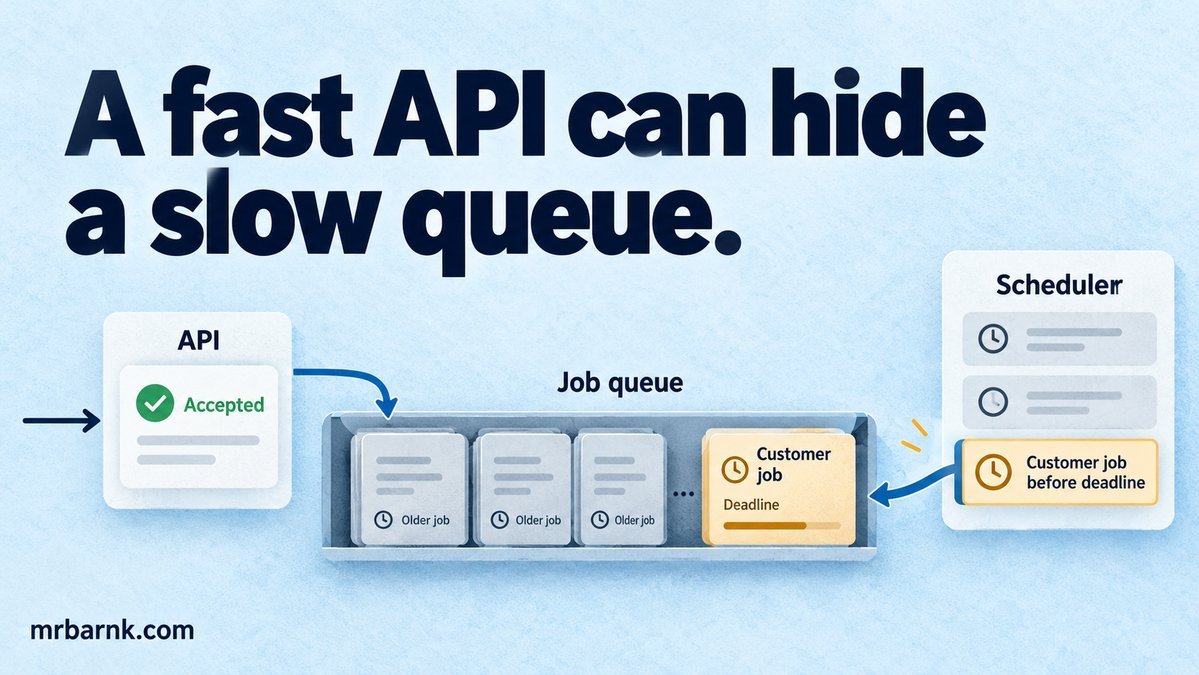
Background job queue latency can disappear from your API dashboard while getting worse for the customer. The endpoint returns quickly, but the requested result spends several seconds waiting for a worker. Moving the work changed where the wait happened.
Let’s measure that hidden wait before adding workers. Then we’ll decide which jobs should start next and which are already too old to be useful.
Record when the work becomes ready
Store acceptance time, available time, claim time and completion time separately. A deliberate retry delay isn’t the same as waiting for a free worker. Both affect the customer, but they need different fixes.
Also record the business deadline. A message explaining a temporary stock check may be useless after the conversation has moved on. A financial reconciliation task may remain necessary even when its customer-facing deadline has passed.
Keep those work classes separate. Expiring an old chat reply is reasonable; dropping an unpaid accounting obligation because it is old is not.
Decide which work can wait
Give interactive work a bounded capacity allocation and move optional analytics or summaries away from the reply path. Don’t move a required validation into the background and immediately claim the action succeeded.
A queue can absorb a burst, but it cannot create processing capacity. If arrivals exceed completions for long enough, waiting grows. You need admission control, reduced work, more usable capacity or an explicit delayed-service policy.
Broker delivery settings matter too. Unacknowledged work held by a consumer may not appear as ready queue depth. RabbitMQ documents acknowledgement behaviour; include in-flight work when diagnosing the wait. Acknowledgement reference.
Build a deadline-aware selection rule
The example uses a controlled clock and one worker slot. It drops an expired interactive job and chooses the earliest deadline among the remaining jobs in this same work class.
import assert from 'node:assert/strict';
let now=100;
const jobs=[{id:'expired',deadline:90,duration:5},{id:'long',deadline:500,duration:100},{id:'urgent',deadline:150,duration:10}];
const expired=[],completed=[];
while(jobs.length){
  for(let i=jobs.length-1;i>=0;i--)if(jobs[i].deadline<=now)expired.push(jobs.splice(i,1)[0].id);
  jobs.sort((a,b)=>a.deadline-b.deadline);
  const job=jobs.shift();if(!job)break;
  const claimedAt=now;now+=job.duration;
  completed.push({id:job.id,claimedAt,completedAt:now});
}
assert.deepEqual(expired,['expired']);
assert.deepEqual(completed.map(j=>j.id),['urgent','long']);
assert.equal(completed[0].completedAt,110);
console.log('PASS: controlled-clock deadline selection and explicit expired outcome');
The urgent short job starts first, while the expired job is recorded explicitly. This is a scheduling-policy test, not a throughput benchmark. The duration fields are chosen inputs.
Earliest-deadline-first isn’t universally best. A long job can still block a short one after it starts, and mixed workloads may need reserved lanes or fair sharing. The useful part is making the policy observable instead of burying it in queue order.
Bound the amount of work you admit
Choose an admission limit based on queue age, in-flight work and the resources you can actually supply. An unbounded queue can keep accepting requests long after timely completion is impossible.
Return an honest response when the service can’t meet the task’s requirement. Depending on the product, that may mean a retry suggestion, a delayed operation ID or escalation to a person.
Don’t release every delayed retry at once after an outage. Spread retries and reserve capacity for fresh interactive work. Otherwise, recovery traffic can recreate the failure that caused the backlog.
Add workers only where the bottleneck allows it
More workers can help when jobs mostly wait on independent services with spare capacity. They can hurt when every job competes for the same database lock, connection pool or provider quota.
Measure service time, queue time and downstream throttling as you increase concurrency. Watch high percentiles and oldest-job age, not only average completion rate.
Remember that worker settings multiply across processes. Eight slots in each of ten processes permits up to eighty simultaneous tasks, even if the database pool was sized for a much smaller number.
Keep expired and failed work distinguishable
An expired reply wasn’t necessarily broken; it missed its useful window. A failed job may still be timely if a safe retry can succeed. Store these outcomes separately.
For tasks that change business records, deadline expiry can trigger a different workflow rather than deletion. A payment result may need reconciliation and a customer update, even after checkout timed out.
Record who or what cancelled the job, its input revision and the last attempted operation. That makes stale work easier to investigate and prevents an operator from replaying an old conversation reply into a current human handoff.
Test normal load and a burst
Run the same work with a steady arrival pattern, then a burst. Keep client behaviour explicit: clients waiting for a final result generate a different workload from clients submitting everything immediately.
Measure acceptance-to-completion alongside endpoint response time. Include expired, rejected and failed tasks in the report rather than calculating a pleasing percentile from only the easy successes.
The local scheduler gives you a deterministic place to test your policy. A real capacity experiment needs representative service times, pool limits and provider behaviour.
Start by adding claim time to your job records. If most of the customer’s wait is before a worker even starts, optimising the function inside that worker won’t fix the part they’re actually waiting on.
Run the example and adapt it
Save the code as 20-queue-deadline-scheduling.mjs and run it with Node.js 24 or later:
node 20-queue-deadline-scheduling.mjs
The code above includes assertions you can run locally. It tests the local decision logic with controlled inputs; it doesn’t connect to a live provider or establish production performance. Keep that boundary when adapting it to your application.