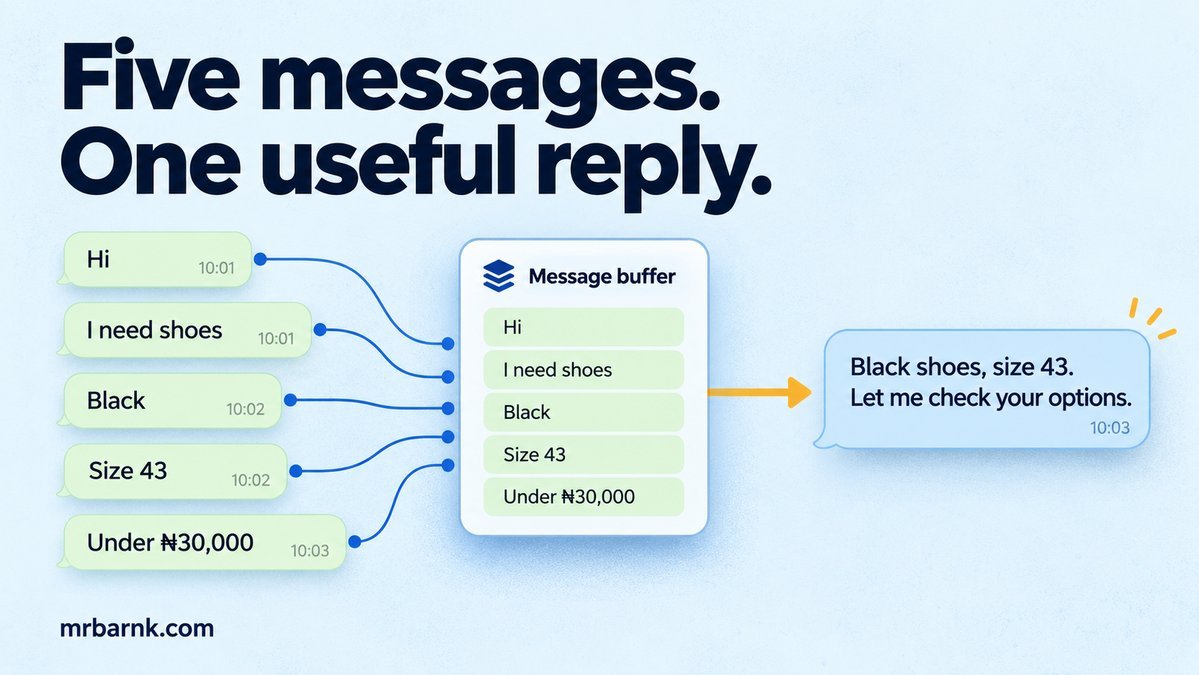
WhatsApp message batching becomes useful when a customer sends their request in pieces. They ask for shoes, then send “black”, then “size 43”. If your bot answers each message separately, it can recommend the wrong product while the customer is still explaining what they want.
The messages aren’t necessarily duplicates. Each one adds something. We need to preserve that information without starting three competing replies.
Let’s begin with the part we control: deciding when one response should start. After that, we’ll handle a new message arriving while that response is being prepared.
First, keep each incoming message
Don’t solve this by dropping messages while a worker is busy. “Size 43” may be the most important part of the order. Save each accepted message before acknowledging its webhook.
A useful inbox key is (business_phone_id, provider_message_id). It stops repeated delivery of the same event from adding the same words twice. Store the customer ID, text, provider timestamp and local acceptance sequence as separate fields. A timestamp helps explain timing; it doesn’t by itself establish a reliable total order.
Keep conversation state in another row: (business_phone_id, customer_id, revision, opened_at, due_at, pending_ids). In a real database, pending messages can live in child rows rather than an ever-growing array.
At this point, we’ve preserved the request. We still need to decide when to answer it.
Give the customer a short collection window
A collection window lets related messages arrive before starting the expensive work. Every arrival can move the due time a little, but set a maximum wait from the first message. Otherwise, someone who keeps typing can postpone their reply forever.
The example uses an illustrative quiet window of 250 ms and a maximum of 700 ms. These aren’t WhatsApp requirements. Measure the extra delay on your users’ actual message patterns before choosing them.
Node timers schedule callbacks; they don’t promise exact wall-clock execution. Store the due time and recheck it when the callback runs. That also gives a restarted worker something meaningful to recover. Node timers documentation.
A batch can become old while it’s running
Suppose the worker starts searching for black shoes. The customer then says “actually, white”. Cancelling the timer won’t cancel a search that has already started.
Increment a conversation revision on every accepted message. A response task remembers the revision it started with. Before submitting the answer, compare it with the current revision. If they differ, the task must not send its old answer.
This is why the buffer and the response gate are separate. The buffer groups nearby input. The revision protects against later input.
Build the scheduling decision
This local example uses an injected clock rather than waiting for real timers. That makes the quiet-window and maximum-wait rules repeatable. The assertions also check duplicate input and an answer becoming stale.
import assert from 'node:assert/strict';
let now = 0;
const seen = new Set();
const state = { revision: 0, opened: null, due: null, messages: [] };
function receive(id, text) {
  if (seen.has(id)) return false;
  seen.add(id);
  if (state.opened === null) state.opened = now;
  state.messages.push({ id, text });
  state.revision++;
  state.due = Math.min(now + 250, state.opened + 700);
  return true;
}
function snapshot() {
  assert.ok(now >= state.due);
  return { revision: state.revision, messages: structuredClone(state.messages) };
}
const maySend = batch => batch.revision === state.revision;
receive('a', 'Shoes');
now = 100; receive('b', 'Black');
now = 200; receive('c', 'Size 43');
assert.equal(receive('c', 'Size 43'), false);
now = 450;
const first = snapshot();
assert.equal(first.messages.length, 3);
now = 500; receive('d', 'Actually white');
assert.equal(maySend(first), false);
now = 650; receive('e', 'Please');
assert.equal(state.due, 700);
now = 700;
assert.equal(maySend(snapshot()), true);
console.log('PASS: bounded batching, deduplication and stale reply gate');
The first three messages become one snapshot. After the correction arrives, maySend(first) is false. Notice that we haven’t merged the words into an order automatically. The next step still needs to interpret the complete request and ask for clarification when the meaning is uncertain.
Move the state into durable storage
For multiple workers, update the conversation revision and append the inbox reference in one transaction. A worker should claim a specific conversation revision, not just an arbitrary text string. Keep the claim deadline and worker identity alongside it.
When preparing a snapshot, select the messages that belong to it and store their IDs. Don’t clear all pending messages after a send: a message may have arrived after the snapshot was taken. Mark only the snapshot’s IDs as handled after recording the send outcome.
The in-memory example intentionally retains messages for the assertion. In production, distinguish unhandled input from the bounded context carried into the next turn. Archive handled messages under a retention policy. That prevents a later “thanks” from causing the entire shopping request to be processed again.
Watch the gap before the external send
A revision check and an external WhatsApp Cloud API request aren’t one database transaction. Another message can arrive after the check but before the send. Keep that gap small and use one sender per conversation, but don’t promise that this eliminates every possible race.
For actions such as placing an order, add a separate confirmation boundary. A text correction should invalidate the uncommitted proposal, while a completed purchase needs an explicit change or cancellation flow.
Also decide how to handle a continuous stream of messages. You may send one short clarification after the maximum wait, then gather the next turn. The scheduling policy shouldn’t quietly turn unlimited input into unlimited model calls.
Test the conversations, not just the timer
Replay a burst, a long pause, an exact duplicate and a correction during generation. Then restart the worker after it has claimed a batch. Check which message IDs were included and whether any old answer was sent.
Track batch size, time from first message to answer, discarded stale generations and unanswered input. A larger collection window may reduce fragmented responses while making simple questions feel slower. Compare both outcomes before changing it.
Start with one representative conversation from your own bot. Reproduce its message timings, then tune the window while keeping the maximum wait and freshness check in place.
Run the example and adapt it
Save the code as 02-whatsapp-message-bursts.mjs and run it with Node.js 24 or later:
node 02-whatsapp-message-bursts.mjs
The code above includes assertions you can run locally. It tests the local decision logic with controlled inputs; it doesn’t connect to a live provider or establish production performance. Keep that boundary when adapting it to your application.