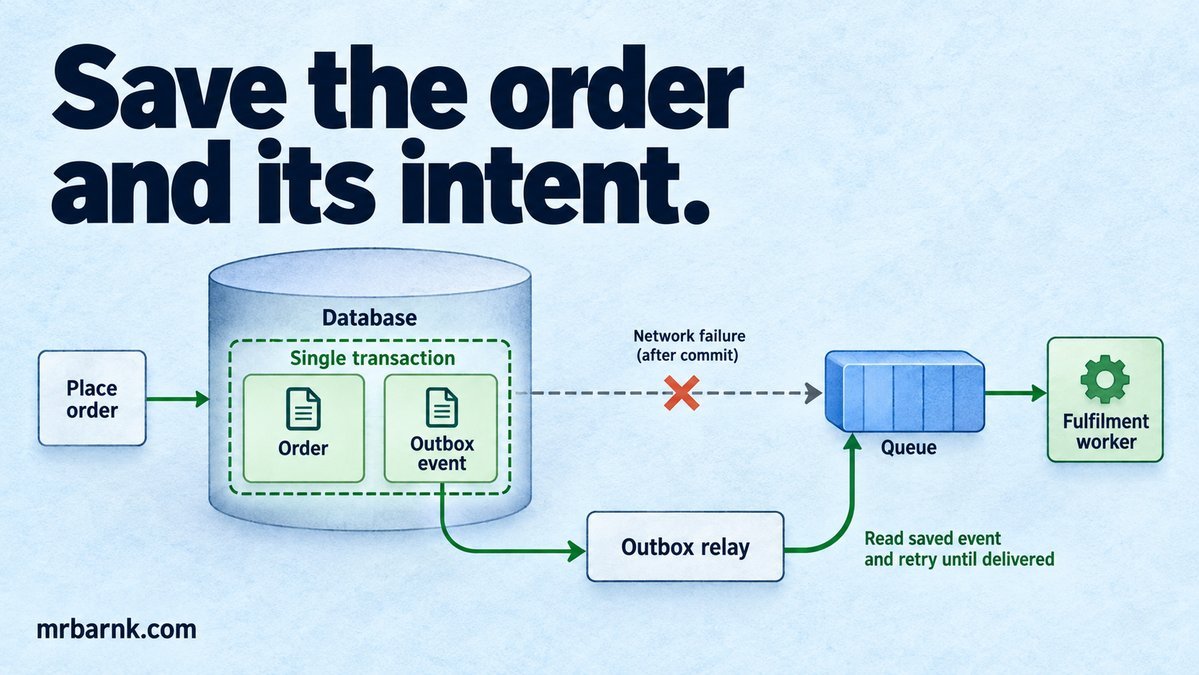
A transactional outbox helps when an order saves successfully but the queue never receives its fulfilment job. Everything looked fine until the process stopped between the database write and the broker publish. Now the order exists, but nothing is working on it.
Retrying the whole request can create another order. Ignoring the gap leaves the first order stuck. Let’s save the obligation to publish alongside the order itself.
Put the event in the same transaction
Create an outbox table in the order database. When you save the order, insert an event describing the work that must follow. Commit both or roll back both.
The outbox isn’t the external broker. It’s a durable record that the application owes the broker a message. That distinction removes the need to make two different systems commit at the same instant.
AWS describes this as a way to address dual writes. Our local implementation will exercise the database boundary directly. Transactional outbox reference.
Give the relay permission to repeat publication
A relay reads unpublished events and sends them to the broker. After confirmation, it marks them published. If it crashes after the broker accepts an event but before the marker commits, it may publish again.
Trying to hide that possibility creates another loss window. Instead, give each event a stable ID and make the consumer safe to process the same ID again.
Keep the event’s aggregate ID and version too. Duplicate detection doesn’t solve ordering. Two different updates for the same order may need an ordering or version policy when delivered to different consumers.
Build the database boundary and replay test
The example uses real SQLite transactions. It rolls back a failed order write, saves a successful order with its outbox record, then simulates the relay publishing that record twice.
import assert from 'node:assert/strict';
import { DatabaseSync } from 'node:sqlite';
const db=new DatabaseSync(':memory:');
db.exec(`CREATE TABLE orders(id TEXT PRIMARY KEY);CREATE TABLE outbox(id TEXT PRIMARY KEY,order_id TEXT);
CREATE TABLE consumed(id TEXT PRIMARY KEY);CREATE TABLE fulfilments(order_id TEXT PRIMARY KEY);`);
function create(id,crash=false){db.exec('BEGIN');try{
  db.prepare('INSERT INTO orders VALUES(?)').run(id);
  if(crash)throw new Error('Before outbox');
  db.prepare('INSERT INTO outbox VALUES(?,?)').run(`event:${id}`,id);db.exec('COMMIT');
}catch(e){db.exec('ROLLBACK');throw e;}}
assert.throws(()=>create('lost',true));
assert.equal(db.prepare('SELECT count(*) n FROM orders').get().n,0);
create('o1');
function consume(event){db.exec('BEGIN');try{
  const r=db.prepare('INSERT OR IGNORE INTO consumed VALUES(?)').run(event.id);
  if(r.changes)db.prepare('INSERT INTO fulfilments VALUES(?)').run(event.order_id);
  db.exec('COMMIT');
}catch(e){db.exec('ROLLBACK');throw e;}}
const e=db.prepare('SELECT * FROM outbox').get();consume(e);consume(e);
assert.equal(db.prepare('SELECT count(*) n FROM fulfilments').get().n,1);
db.close();console.log('PASS: atomic order/outbox rollback and repeatable consumer effect');
The consumer’s marker and business effect commit together. That’s important: marking an event handled before its effect commits would let a crash erase the work permanently.
The example models publication by calling a local consumer. It doesn’t connect to RabbitMQ or prove a broker durability configuration. It tests the local transaction and duplicate-processing rule.
Claim outbox work safely
With several relays, claim rows using a lease or your database’s queue-consumer primitive. Store the claim owner and deadline. A relay should not update a row after losing its claim.
Don’t keep a long database transaction open while a slow broker call runs. Claim a small batch, commit the claim and publish with a deadline. Recovery can reclaim abandoned work after the lease expires.
Track retry count, next available time and the last error class. Permanent payload errors need a visible exception path; they shouldn’t block every later event indefinitely.
Choose the event content deliberately
Include enough information for the consumer’s contract. An event can carry an immutable snapshot or a reference that the consumer resolves. Each choice has tradeoffs.
A snapshot preserves what happened, but can contain data you shouldn’t copy widely. A reference keeps the payload small, but a later lookup may see a different order state or fail after deletion. Decide which interpretation the event promises.
Version the schema and validate it at both ends. Don’t let a renamed field turn old outbox rows into an unprocessable backlog after a deployment.
Deduplicate the effect, not only the transport
An event ID prevents the same event being applied twice. A business operation ID can also protect against two different events requesting the same external effect.
For example, two distinct “fulfil this order” events might share an order fulfilment key. The consumer needs the business constraint as well as transport deduplication. Keep those keys separate so you can investigate whether the issue was replay or duplicate intent creation.
An external email, payment or message call remains outside the consumer’s local transaction. Use its supported idempotency or reconciliation mechanism, and record uncertainty where you can’t atomically bridge the boundary.
Operate the relay as part of the product
Monitor the oldest unpublished event, publication failures and consumer lag. Queue depth alone can look small while one poison event has been waiting for hours.
Keep a repair interface that can inspect and retry an event by ID without inventing a new ID. Retention for processed-event markers must cover the replay horizon you actually support.
Test crashes before commit, after commit, after broker confirmation and before consumer commit. Check that an order is never committed without its outbox obligation and that replay doesn’t repeat the tested business effect.
Start with one order transition and one outbox event. Once the failure gap is closed there, expand the pattern where a real database-plus-publication boundary exists rather than adding an outbox to every harmless local function.
Run the example and adapt it
Save the code as 19-transactional-outbox-nodejs.mjs and run it with Node.js 24 or later:
node 19-transactional-outbox-nodejs.mjs
The code above includes assertions you can run locally. It tests the local decision logic with controlled inputs; it doesn’t connect to a live provider or establish production performance. Keep that boundary when adapting it to your application.